Python program structure
♦ Programs are composed of modules
♦ Modules contain statements
♦ Statements contain expressions: logic
♦ Expressions create and process objects
|
Statement |
Examples |
|
Assignment |
curly,
moe, larry = 'good',
'bad', 'ugly' |
|
Calls |
stdout.write("spam,
ham, toast\n") |
|
Print (a call in 3.X) |
print
1, "spam", 4, 'u', |
|
If/elif/else |
if
"python" in text: mail(poster, spam) |
|
For/else |
for peteSake in spam: print peteSake |
|
While/else |
while
1: print 'spam',i;
i=i+1 |
|
Pass |
while
1: pass |
|
Break, Continue |
while
1: break |
|
Try/except/finally |
try:
spam() except: print 'spam error' |
|
Raise |
raise
overWorked, cause |
|
Import, From |
import
chips; from refrigerator import beer |
|
Def, Return,Yield |
def
f(a, b, c=1, *d): return a+b+c+d[0] |
|
Class |
class
subclass(superclass): staticData = [] |
|
Global, Nonlocal (3.X) |
def
function(): global x, y; x = 'new' |
|
Del |
del
spam[k]; del spam[i:j]; del spam.attr |
|
Exec (a call in 3.X) |
exec
"import " + moduleName in gdict, ldict |
|
Assert |
assert
name != "", "empty name field" |
|
With/As (2.6+) |
with
open('text.dat') as F: process(F) |
General
syntax concepts
Python syntax
♦ No variable/type declarations
♦ No braces or semicolons
♦ The “what you see is what you get” of languages
Python assignment
♦ Assignments create object references
♦ Names are created when first assigned
♦ Names must be assigned before being referenced
A Tale of Two Ifs…
C++/Java/etc.:
if (x) {
x = y + z; // braces, semicolons, parens
}
Python:
if x:
x = y + z # indented blocks, end of line, colon
● What Python removes [(), ;, {}], and adds [:]
● Why indentation syntax? [readability counts!]
Demo: coding read/eval loops
■ while loop → input, process, print
■ Console input: input() in 3.X, raw_input() in 2.X
■ Console output: print(reply) in 3.X, “print reply” in 2.X
■ Adding converters, if/elif/else, try/except/else
Assignment
♦ ‘=’ assigns object references to names or components
♦ Implicit assignments: import, from, def, class, for, calls
|
Operation |
Interpretation |
|
spam
= 'SPAM' |
basic
form |
|
spam,
ham = 'yum', 'YUM' |
tuple
assignment |
|
[spam,
ham] = ['yum', 'YUM'] |
list
assignment |
|
a,
b, c, d = 'spam' |
sequence
assign |
|
spam
= ham = 'lunch' |
multiple-target |
|
spam
+= 42; ham *= 12 |
Augmented
(2.0) |
|
a,
*b, c = [1, 2, 3, 4] |
Extended
(3.X) |
See also “About the stars…” in functions unit, for
“*X” forms that unpack instead of collecting
Variable name rules
♦ (‘_’ or letter) + (any number of letters, digits, ‘_’s)
♦ Case matters: ‘SPAM’ is not ‘spam’
♦ But can’t use reserved words:
■ + “yield”,
for generators (2.3 and later)
■ + “with”
and “as” for context managers (2.6,
optional in 2.5 though not in 2.5 IDLE!)
■ 3.X:
minus “print”, “exec”; plus “None”, “True”, “False”, “nonlocal” (and in 3.5+: “async”, “await”)
|
and |
assert |
break |
class |
|
continue |
def |
del |
elif |
|
else |
except |
exec |
finally |
|
for |
from |
global |
if |
|
import |
in |
is |
lambda |
|
not |
or |
pass |
print |
|
raise |
return |
try |
while |
♦ Also applies to module file names:
►
‘my-code.py’ can be
run, but not imported!
Expressions
♦ Useful for calls, and interactive prints
♦ Expressions can be used as statements
♦ But statements cannot be used as expressions (‘=’)
|
Operation |
Interpretation |
|
spam(eggs,
ham) |
function
calls |
|
spam.ham(eggs) |
method
calls |
|
spam |
interactive
print |
|
spam
< ham and ham != eggs |
compound
expr's |
|
spam
< ham < eggs |
range
tests |
See ahead…
♦ Python 2.0+ “list comprehension” expressions (covered in Functions)
♦ Similar to map/lambda combination (result=[0,1,4,9])
[i**2 for i in
range(4)] …like… map((lamba x:
x**2), range(4))
Print
♦ ‘print’ statement writes objects to the ‘stdout’ stream
♦ File object ‘write’ methods write strings to files
♦ Adding a trailing comma suppresses line-feed
♦ Reset ‘sys.stdout’ to catch print output
♦ 3.X: a built-in function call with arguments in “()”
Python 2.X form:
|
Operation |
Interpretation |
|
print
spam, ham |
print
objects to sys.stdout |
|
print
spam, ham, |
don’t
add linefeed at end |
|
print>>file,
spam |
Python
2.0: not to stdout |
Python 3.X form:
print(spam, ham, sep='::', end='.\n', file=open('save.txt', 'w'),
flush=True)
Usable in 2.X
via:
from __future__
import print_function
Otherwise, 2.X → 3.X mappings:
print a → print(a)
print a, b, c → print(a, b, c)
print a, b, → print(a, b, end='')
print>>F,
a → print(a, file=F)
The Python ‘Hello world’ program
● Expression results don’t need to be printed at top-level
>>> print 'hello world' # 3.X: print('text')
hello world
>>> 'hello world'
'hello world'
● The hard way
>>> x = 'hello world'
>>> import sys
>>> sys.stdout.write(str(x) + '\n')
● sys.stdout can be assigned
>>> sys.stdout = open('log', 'a') # or a class with .write
>>> print x
If
selections
♦ Python’s main selection construct
♦ No ‘switch’: via if/elif/else, dictionaries, or lists
♦ See also expression ahead: X = B if A else C
General format
if <test1>:
<statements1>
elif <test2>: # optional elif’s
<statements2>
else: # optional else
<statements3>
Examples
>>> if 3 > 2:
... print 'yep'
...
yep
>>> x = 'killer rabbit'
>>> if x == 'bunny':
... print 'hello little bunny'
... elif x == 'bugs':
... print "what's up doc?"
... else:
... print 'Run away!... Run away!...'
...
Run away!... Run away!...
>>> choice = 'ham'
>>> print {'spam': 1.25, # dictionary switch
... 'ham': 1.99,
... 'eggs': 0.99,
... 'bacon': 1.10}[choice]
1.99
# with
actions
{'spam': (lambda: …),
'ham':
(lambda: …),
…}[choice]()
Python
syntax rules
♦ Compound statements = header, ‘:’, indented statements
♦ Block and statement boundaries detected automatically
♦ Comments run from “#” through end of line
♦ Documentation strings at top of file, class, function
Block delimiters
♦ Block boundaries detected by
line indentation
♦ Indentation is any
combination of spaces and tabs
♦ Tabs = N spaces up to
multiple of 8 (but don’t mix)
Statement delimiters
♦ Statement normally end at
end-of-line, or ';'
♦ Statements may span lines if
open syntactic pair: ( ), { }, [ ]
♦ Statements may span lines if
end in backslash (outdated feature)
♦ Some string constants span
lines too (triple-quotes)
Special cases
L = ["Good",
"Bad",
"Ugly"] # open pairs may span lines
x = 1; y = 2; print x # more than 1 simple statement
if 1: print 'hello' # simple statement on header line
Nesting code blocks
x = 1 # block0
if x:
y = 2 # block1
if y:
print 'block2'
print 'block1'
print 'block0'
The documentation
sources interlude
|
Form |
Role |
|
# comments |
In-file
documentation |
|
The
dir function |
Lists
of attributes available on objects |
|
Docstrings: __doc__ |
In-file
documentation attached to objects |
|
PyDoc: The help function |
Interactive
help for objects |
|
PyDoc: HTML reports |
Module
documentation in a browser |
|
Standard
manual set |
Official
language and library descriptions |
|
Web
resources |
Online
tutorial, examples, and so on |
|
Published
books |
Commercially-available
texts (see Resources) |
>>> import sys
>>> dir(sys) # also works on types, objects, etc.
['__displayhook__', '__doc__', '__excepthook__', '__name__', …
>>> print sys.__doc__
This module provides access to some objects …
>>> help(sys)
Help on built-in module sys: …
PyDoc
● GUI till 3.2:
■ Start/App menu, PythonXX/ModuleDocs
■ Or run Python script pydocgui.pyw in std lib
■ Or command line “python -m pydoc –g” (or C:\Python3x\python …)
● Browser in 3.2+:
■ Command line “python -m pydoc –b”
■ Or on Windows “py −3 -m pydoc –b”
■ Or on some Python 3.X: Start/App menu, PythonXX/ModuleDocs
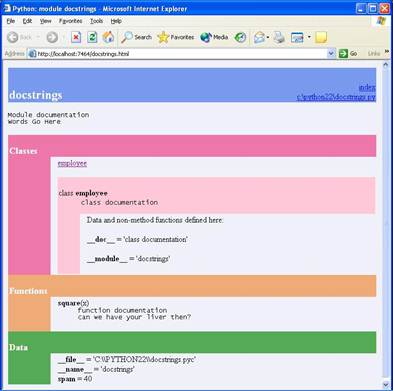
# File: docstrings.py
"""
Module documentation
Words Go Here
"""
spam = 40
def square(x):
"""
function documentation
can we have your liver then?
"""
return x ** 2
class SomeClass: # see ahead
"""
class docs go here, and can also
be in nested method def statements
"""
pass
>>> import docstrings
>>> help(docstrings)
>>> help(docstrings.square)
Truth
tests revisited
♦ True = non-zero number, or non-empty object
♦ Comparisons operators return “True” (1) or “False” (0)
♦ Boolean operators “short-circuit” when result known
♦ Boolean operators return an operand object
|
Object |
Value |
|
"spam" |
true |
|
"" |
false |
|
[] |
false |
|
{} |
false |
|
1 |
true |
|
0.0 |
false |
|
None |
false |
Examples
>>> 2 < 3, 3 < 2 # return True (1) or False (0)
(True, False)
>>> 2 or 3, 3 or 2 # return left operand if true
(2, 3) # else return right operand (T|F)
>>> [] or 3
3
>>> [] or {}
{}
>>> 2 and 3, 3 and 2 # return left operand if false
(3, 2) # else return right operand (T|F)
>>> [] and {}
[]
>>> 3 and []
[]
C’s ternary operator in Python
●
Prior to 2.5: X = (A and B) or C
●
New in 2.5: X = B if A else C
if A:
X = B
else:
X = C
Boolean type (2.3+)
● bool is a subclass of int
● bool has two instances: True and False
● True,False are 1,0 but print differently
>>> 1 > 0
True
>>> True == 1, True is 1
(True, False)
>>> True + 1
2
While
loops
♦ Python’s most general iteration construct
♦ One of two looping statements: while, for
♦ Implicit looping tools: map, reduce, filter, in, list (and other) comprehensions
General format
while <test>:
<statements>
else: # optional else
<statements2> # run if didn’t exit with break
Examples
>>> while True:
... print 'Type Ctrl-C to stop me!'
>>> count = 5
>>> while count:
... print count,
... count -= 1
...
5 4 3 2 1
>>> x = 'spam'
>>> while x:
... print x,
... x = x[1:] # strip first char off x
...
spam pam am m
>>> a=0; b=10
>>> while a < b: # one way to code counter loops
... print a, # 3.X: print(a, end='')
... a = a+1 # or: a += 1
...
0 1 2 3 4 5 6 7 8 9
Break,
continue, pass, and the loop else
♦ break jumps out of the closest enclosing loop
♦ continue jumps to the top of the closest enclosing loop
♦ pass does nothing: an empty statement placeholder
♦ loop else run if loop exits normally, without a ‘break’
♦ 3.X ‘…’ a literal ‘…’ ellipsis can work like a ‘pass’
General loop format
while <test>:
<statements>
if <test>: break # exit loop now, skip else
if <test>: continue # go to top of loop now
else:
<statements> # if we didn’t hit a ‘break’
Examples
■ Pass: an infinite loop
● Better example: stubbed-out function bodies, “TBD”
while True: pass # ctrl-C to stop!
■ Continue: print even numbers
● Avoids statement nesting (but use sparingly!)
x = 10
while x:
x = x-1
if x % 2 != 0: continue # odd?--skip
print x,
■ Break: find factors
● Avoids search status flags
x = y / 2
while x > 1:
if y % x == 0: # remainder
print y, 'has factor', x
break # skip else
x = x-1
else: # normal exit
print y, 'is prime'
For
loops
♦ A general sequence (iterable) iterator
♦ Works on strings, lists, tuples, other
♦ Replaces most ‘counter’ style loops
♦ Original: repeatedly indexes object until IndexError detected
♦ Newer: repeatedly calls next(iter(object)) until StopIteration
♦ Preview: also works on Python classes and C types
General format
for <target> in <object>: # assign object items to target
<statements>
if <test>: break # exit loop now, skip else
if <test>: continue # go to top of loop now
else:
<statements> # if we didn’t hit a ‘break’
Examples
>>> for x in ["spam", "eggs", "spam"]:
... print x,
...
spam eggs spam
>>> prod = 1
>>> for i in (1, 2, 3, 4): prod *= i # tuples
...
>>> prod
24
>>> S = 'spam'
>>> for c in S: print c # strings
...
s
p
a
m
Works on any iterable object: files, dicts
>>> for line in open('data.txt'):
print line.upper() # calls next(), catches exc
>>> for key in D:
print key, D[key]
Demo: iteration protocol and files
■ file.__next__() gets next line, like file.readline(), but eof differs
■ Use file.next() in 2.X, or next(file) in either 2.X or 3.X
■ All iteration tools/contexts use the iteration protocol
■ Protocol: I=iter(X), call next(I) * N, catch StopIteration
■ iter(X) optional for single-scan iterables (e.g., files)
■ Any such object works in for loops, comprehensions, …
■ line.rstrip(), line.upper() are string methods
Comprehensions:
●
[expr-with-var for var in iterable]
●
[expr-with-var for var in iterable if expr-with-var]
●
[expr-with-vars for var1 in iterable1 for var2 in iterable2]
● Also works for sets, dictionaries, generators in 2.7+: {}, ()
● Hint: comps have statement equivalents: for/if/append() nesting
● Hint: KISS! – if it’s hard for you read, don’t do it…
Loop coding techniques
♦ for subsumes most counter loops
♦ range generates a list of integers to iterate over
♦ xrange similar, but doesn’t create a real list
♦ avoid range, and the temptation to count things!
# The easy (and fast) way
>>> X = 'spam'
>>> for item in X: print item, # step through items
...
s p a m
# The hard way: a C-style for loop
>>> i = 0
>>> while i < len(X): # manual while indexing
... print X[i],; i += 1
...
s p a m
# Range and fixed repitions
>>> range(5), range(2, 5)
([0, 1, 2, 3, 4], [2, 3, 4])
>>> for i in range(4): print 'A shrubbery!'
...
A shrubbery!
A shrubbery!
A shrubbery!
A shrubbery!
# Using range to generate offsets (not items!)
>>> X
'spam'
>>> len(X)
4
>>> range(len(X))
[0, 1, 2, 3]
>>> for i in range(len(X)): print X[i], # step through offsets
...
s p a m
# Using range and slicing for non-exhaustive traversals
>>> range(2,10,2)
[2, 4, 6, 8]
>>> S = 'abcdefghijk'
>>> for i in range(0,len(S),2): print S[i],
...
a c e g i k
in recent releases…
>>> for c in S[::2]: print c, # S[::-1] reverses
...
a c e g i k
# Using range and enumerate to change a list in-place
>>> L = [1, 2, 3, 4]
>>> for x in L: x += 10
>>> L
[1, 2, 3, 4]
>>> for i in range(len(L)): L[i] += 10
>>> L
[11, 12, 13, 14]
List comprehensions
>>> M = [x + 10 for x in L]
>> M
21, 22, 23, 24]
>>> lines = [line.rstrip() for line in open('README.txt')]
>>> [row[1] for row in matrix]
… more in functions section
Demo: list comprehensions and files
■ Unless covered earlier (see above)
Enumerate in 2.3+
>>> for (i, x) in enumerate(L):
L[i] = x * 2
>>> L
[22, 24, 26, 28]
>>> enumerate(L)
<enumerate object at 0x00B48440>
>>> list(enumerate(L))
[(0, 22), (1, 24), (2, 26), (3, 28)]
>>> E = enumerate(L)
>>> E.next()
(0, 22)
>>> E.next() # see generators in next section
(1, 24)
# Traversing sequences in parallel with zip
>>> L1 = [1,2,3,4]
>>> L2 = [5,6,7,8]
>>>
>>> zip(L1,L2)
[(1, 5), (2, 6), (3, 7), (4, 8)]
>>>
>>> for (x,y) in zip(L1, L2):
... print x, y, '--', x+y
...
1 5 -- 6
2 6 -- 8
3 7 -- 10
4 8 -- 12
# Traversing dictionaries by sorted keys
>>> D = {'a':1, 'b':2, 'c':3}
>>> D
{'a': 1, 'c': 3, 'b': 2}
>>> Ks = D.keys()
>>> Ks.sort()
>>> for k in Ks: print D[k],
1 2 3
Sorted in 2.4+
>>> D
{'a': 1, 'c': 3, 'b': 2}
>>> for k in sorted(D): print D[k],
1 2 3
Comprehensive loop
examples
Matrix processing, with nested loops + comprehensions
See on class CD: Extras\Code\Misc\matrix-code.py
Common ways to read from files
# file creation
>>> myfile = open('myfile.txt', 'w')
>>> for i in range(3):
myfile.write(('spam' * (i+1)) + '\n')
>>> myfile.close()
# all at once
>>> print open('myfile.txt').read()
spam
spamspam
spamspamspam
# line by line
>>> myfile = open('myfile.txt')
>>> while True:
line = myfile.readline()
if not line: break
print line,
spam
spamspam
spamspamspam
# all lines at once
>>> for line in open('myfile.txt').readlines():
print line,
spam
spamspam
spamspamspam
# file iterators:
line by line
>>> for line in open('myfile.txt'):
print line,
spam
spamspam
spamspamspam
# by byte counts
>>> myfile = open('myfile.txt')
>>> while True:
line = myfile.read(10)
if not line: break
print '[' + line + ']',
[spam
spams] [pam
spamsp] [amspam
]
Summing data file columns
>>> print open('data.txt').read()
001.1 002.2 003.3
010.1 020.2 030.3 040.4
100.1 200.2 300.3
>>> sums = {}
>>> for line in open('data.txt'):
cols = [float(col) for col in line.split()] # next!
for pos, val in enumerate(cols):
sums[pos] = sums.get(pos, 0.0) + val
>>> for key in sorted(sums):
print key, '=', sums[key]
0 = 111.3
1 = 222.6
2 = 333.9
3 = 40.4
>>> sums
{0: 111.3, 1: 222.59999999999999, 2: 333.90000000000003,
3: 40.399999999999999}
Basic coding gotchas
■ Don’t forget to type a “:” at the end of compound statement headers
■ Be sure to start top-level (unnested) code in column 1
■ Blank lines in compound statements are ignored in files, but end the statement at the interactive prompt
■ Avoid mixing tabs and spaces in indentation, unless you’re sure what your editor does with tabs
■ C programmers: you don’t need “( )” around tests in “if” and “while”; you can’t use “{ }” around blocks
■ In-place change operations like list.append() and list.sort() don’t return a value (really, they return “None”); call them without assigning the result.
■ Add parens to call a function: “file.close()” is a call, “file.close” is a reference only
Preview:
program unit statements
■ Create and process higher-level program components
|
Unit |
Role |
|
Functions |
procedural units |
|
Modules |
code/data
packages |
|
Exceptions |
errors and
special cases |
|
Classes |
new objects |
|
C modules |
optimization,
customization, integration |
Lab Session 3
Click here to go to
lab exercises
Click here to go to
exercise solutions
Click here to go to solution source files
Click here to go to
lecture example files